How to implement schema markup step by step (JSON-LD)
How to implement schema markup with JSON-LD, which types to prioritise for your business and how to validate it before publishing. No fluff.

In this article8
- Before implementing schema markup: what to decide first
- How to implement JSON-LD step by step
- How to implement schema markup on your platform
- Common mistakes that break the rich result
- How to validate your implementation
- What schema markup does not promise
- Frequently asked questions about implementing schema markup
- Before publishing: a minimum checklist
You already know what schema markup is and why it matters. The question that probably brought you here is a different one: how to implement it without losing half an afternoon working through the schema.org specification type by type. If you want to understand first what structured data and JSON-LD markup are, start with that guide.
This is the practical companion: which format to use, which types to prioritise for your business, how to place it on your site depending on the platform you use, and how to check you have not broken it before publishing.
Before implementing schema markup: what to decide first
Before touching any code, two decisions shape everything else: which format to use and which schema types to mark up. Skipping this step usually ends in pages with surplus schema in the wrong places and no schema where it actually matters.
Choosing the format: why JSON-LD is the recommended option
There are three supported formats for marking up structured data: JSON-LD, Microdata and RDFa. Google recommends JSON-LD for new projects, and says so in its official introduction to structured data.
The practical reason is that JSON-LD lives in a separate script block, apart from the visible HTML: you can add it, edit it or remove it without touching the page markup, whereas Microdata or RDFa mean editing the attributes of every HTML tag one by one. Microdata and RDFa are still valid, but if you are starting from scratch there is no reason to choose them over JSON-LD.
Which schema types to prioritise for your business
Schema.org defines more than 800 types. Trying to cover them all is the fastest way to end up with a bloated, badly maintained JSON-LD. On most B2B and B2C sites, six types cover practically everything that matters:
| Schema type | What it is for |
|---|---|
| Organization | Identifies your company: name, logo, social profiles, contact details. Defined once, at site level. |
| Product | Describes a product: price, availability, ratings if they genuinely exist. |
| Article | Marks up editorial content: blog, news, guides. |
| LocalBusiness | For businesses with a physical location: address, opening hours, service area. |
| BreadcrumbList | Reflects the page navigation path within the site. |
| Review | Marks up real user or customer reviews, never fabricated ones. |
Start with the one that answers directly to the type of page in front of you: Product on a product page, Article on a blog post, LocalBusiness on the contact page of a physical business. Organization usually goes separately, at site level, so you do not duplicate it on every URL.
How to implement JSON-LD step by step
- Choose the schema type that matches the real content of the page, not the one you would like to have.
- Build the
<script type="application/ld+json">block with the required properties and the recommended ones relevant to that type. - Place it in the page’s
<head>or<body>; Google accepts both locations, so the decision usually comes down to the limitations of your CMS. - If it is Organization, define it once at site template level and do not repeat it on every page: that only adds weight without adding anything new.
- Check that every marked-up value matches the visible content of the page exactly. This rule is not optional: it is in Google’s general structured data guidelines, and it is the most common reason a technically valid markup ends up being useless.
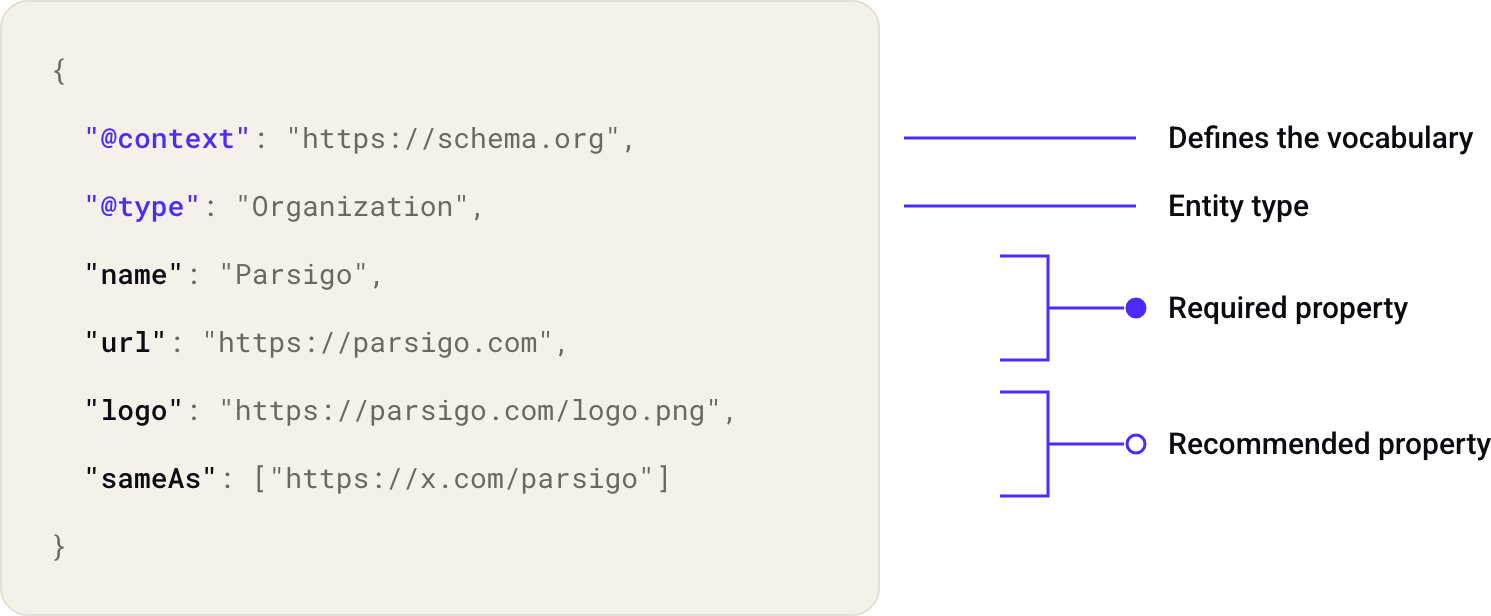
A minimal Organization example, the most common starting point:
{
  "@context": "https://schema.org",
  "@type": "Organization",
  "name": "Your company",
  "url": "https://yourwebsite.com",
  "logo": "https://yourwebsite.com/logo.png",
  "sameAs": [
    "https://www.linkedin.com/company/yourcompany",
    "https://twitter.com/yourcompany"
  ]
}
How to implement schema markup on your platform
WordPress
Plugins such as Yoast SEO or Rank Math generate JSON-LD automatically for Organization, Article and BreadcrumbList from the site settings and the post fields themselves.
They cover the generic types well, but for Product, LocalBusiness with specific data, or Review, you will need to check whether the plugin lets you edit the properties directly or whether it is better to insert the block manually through a code block or a custom field.
Shopify
Shopify includes Product and BreadcrumbList by default in most themes, generated from the product page. The weakest point is Organization: many shops leave it unmarked because there is no obvious place in the admin to do it, and it usually requires editing the theme.liquid file or using a dedicated app.
Sites without a CMS, or plain HTML
With no plugin in the way, the process is the simplest of the three: paste the <script type="application/ld+json"> block straight into the HTML of each template. The advantage is full control over what gets marked up; the drawback is that any content change (a price, an address) has to be updated by hand in two places, the visible one and the schema, or the markup stops matching the page.
Common mistakes that break the rich result
- Incomplete required properties: for example, a Product without
AggregateRatingwhen the type requires it to be eligible. - Malformed JSON: one comma too many or an unclosed quote invalidates the whole block, even if the rest is correct.
- Marked-up data that is not visible to the user on the page: it directly contradicts Google’s guidelines.
- Duplicate entities: the same Organization defined in different ways across several pages of the site.
There is one mistake that shows up in no validator and can only be caught by looking at the real page: a JSON-LD copied from an online generator that validates without syntax errors but describes data that does not exist on that particular page.
How to validate your implementation
Before publishing, run the page through Google’s Rich Results Test. It tells you whether the markup is syntactically valid and whether it is eligible for a rich result, although eligibility is no guarantee it will appear.
After publishing, the work is not over: Search Console and its URL inspection tool let you monitor whether the markup is still valid over time, because a template change can break it weeks later even if the original code was correct.
If you want a full picture of how these errors affect your site (not just the schema, but also crawler access and content readability), Parsigo’s free technical diagnostic reviews the coverage and validity of your existing schema markup within its structure pillar, alongside the rest of the checks on how crawlers read you, including those of AI assistants.
It does not replace the Rich Results Test for validating syntax, but it does give you context on where that error fits within the whole.
What schema markup does not promise
Google has repeatedly confirmed that structured markup is not a direct ranking factor. Its job is to make content eligible for a rich result, never to guarantee that it appears: the official documentation includes that warning explicitly.
FAQPage is the clearest example of this distinction. Since 7 May 2026, the FAQ rich result has stopped showing in Google Search, as Google’s own FAQ structured data documentation confirms and as Search Engine Journal also reports with the full timeline: the Search Console report and Rich Results Test support are withdrawn in June 2026, and Search Console API support in August 2026.
The FAQPage type is still valid in schema.org and Google may still interpret it (useful for other systems that read your site, not just Google Search), but it no longer produces the expandable panel in search results. If you are prioritising which types to implement right now, FAQPage should no longer be one you choose in the hope of gaining visual space in the SERP.
Frequently asked questions about implementing schema markup
What is the best way to implement schema markup?
Use JSON-LD, the format Google recommends for new projects. It goes in a separate script block in the head or the body of the page, and its data must always match the visible content.
Do I need a plugin to add schema markup in WordPress?
It is not compulsory, but plugins such as Yoast SEO or Rank Math automatically generate the most common types (Organization, Article, BreadcrumbList). For more specific types such as Product or LocalBusiness with your own data, you usually need to review the settings or insert the block manually.
How do I check whether my schema markup is valid?
With Google’s Rich Results Test before publishing, and with the Search Console structured data report afterwards, to catch whether a template change has broken it over time.
Does schema markup improve rankings in Google?
Not directly. Google has confirmed it is not a ranking factor; its job is to make content eligible for a rich result, without guaranteeing it will ever be shown.
Is it still worth marking up FAQPage even though it no longer produces a rich result in Google?
The type is still valid in schema.org and can help other systems understand the question-and-answer structure of a page, but since May 2026 it no longer produces the visible expandable panel in Google Search results, so it is not worth implementing in the hope of gaining that particular visibility.
Before publishing: a minimum checklist
- The format used is JSON-LD.
- The types implemented match the real content of the page, with no surplus types marked up.
- Every marked-up property matches what the user sees on the page.
- The block has passed the Rich Results Test with no critical errors.
- Organization is defined once at site level, not duplicated.