Readability for AI crawlers: why they don’t read your site
Your site can look complete in the browser and still reach an AI crawler almost empty. How to check what it really reads, and what to fix first.
In this article7
- What it means for a site to be readable to a crawler
- The heaviest factor: content that only exists with JavaScript
- The signals that make content understandable
- The five checks, ordered by how much they weigh
- Common mistakes when trying to fix readability
- Frequently asked questions about readability for crawlers
- What to check on your site right now
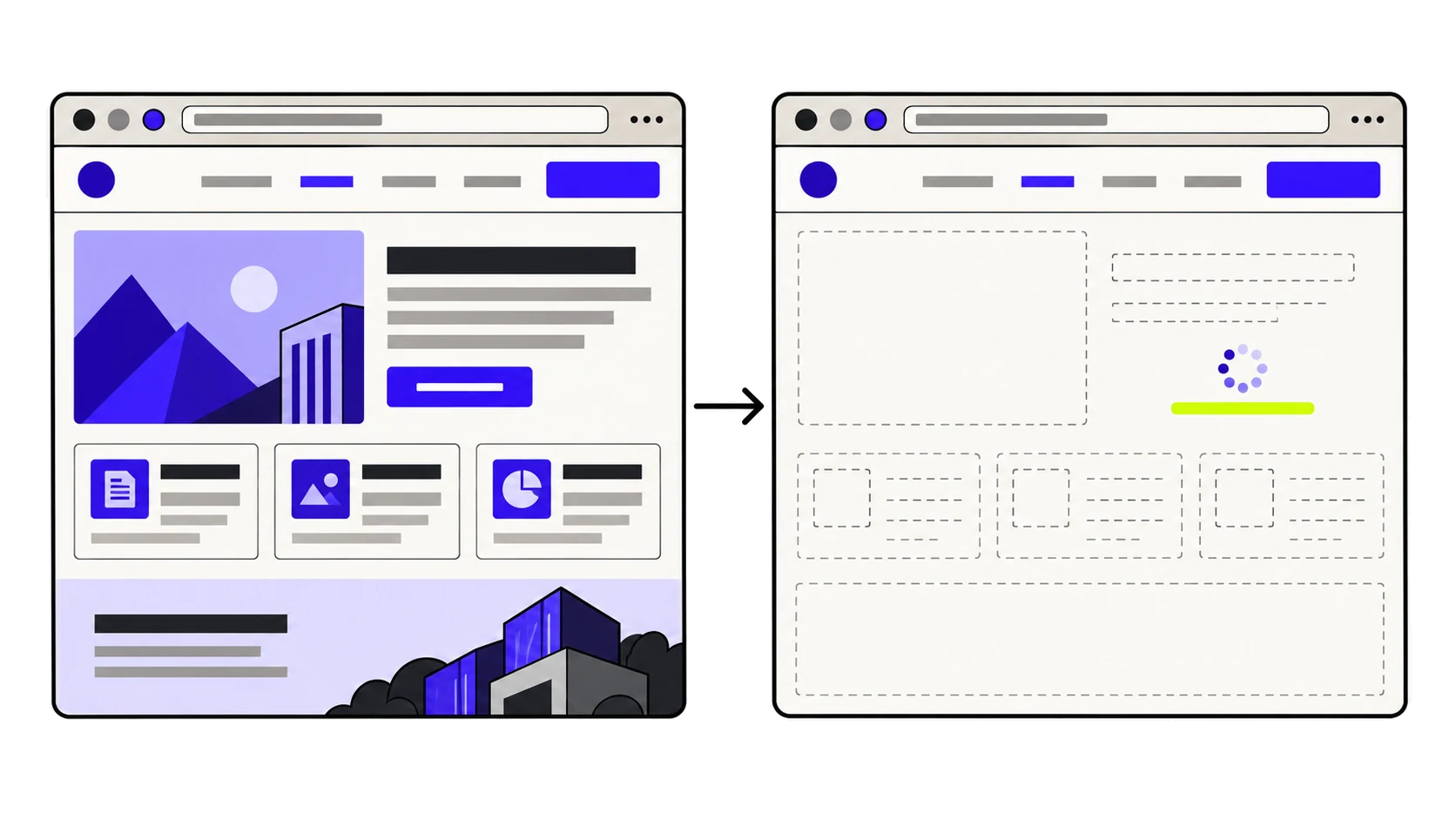
You open your site in the browser and it is all there: the text, the prices, the descriptions. But you ask ChatGPT about your company and it answers with outdated or incomplete information, or with your competitor’s. The most frequent explanation is not that the crawler never reaches your site, but that it arrives and finds nothing to read: it receives an almost empty HTML that only turns into a page after JavaScript runs, something a browser does and not every crawler does.
In this guide you will see what it actually means for a site to be readable to a generative AI crawler, why JavaScript rendering is the single heaviest factor, how to check in under a minute what a crawler really sees when it visits your page, and which other HTML signals decide whether your content is understood or misread.
What it means for a site to be readable to a crawler
Readability is what happens after access. They are two separate problems and it pays not to mix them up: access answers “can the crawler get in?”, and readability answers “once inside, does it understand what it is reading?”. A site can respond correctly to every crawler and still be practically unreadable to them, because what it returns is a skeleton with no content, or a wall of text in which the navigation menu and the article carry the same weight.
If it is the first one that is failing you, the article you need is a different one: how to tell whether your firewall is blocking AI crawlers. This one is about the second.
Machine readability vs. web accessibility
The two concepts overlap, but they are not the same. Web accessibility (WCAG) aims to let a person with a disability use the site: sufficient contrast, keyboard navigation, alternative text on images. Readability for crawlers aims to let a program understand the structure of the content without seeing it.
The overlap is real and worth taking advantage of: well-built semantic HTML, with hierarchical headings and marked-up regions, improves both at once. But they are not equivalent. A site can pass an accessibility audit and still be unreadable to a crawler that does not run JavaScript, because the user’s screen reader does run it and the crawler does not.
The heaviest factor: content that only exists with JavaScript
Of everything you can measure in readability, this is the one that decides the outcome. The rest fine-tune; this one determines whether there is anything to fine-tune.
Why the browser sees it and the crawler does not
When you request a page, the server returns an HTML document. On a server-rendered site, that document already contains the text. On a client-rendered site — the norm in applications built with React, Vue or Angular without extra configuration — that document contains little more than an empty container and a reference to a JavaScript file. The text appears later, when the browser downloads that file, runs it and builds the page.
Your browser does that work without you noticing. A crawler is under no obligation to: running JavaScript across millions of pages is expensive, and not every system that crawls the web to feed AI models does it. Some read the HTML exactly as it leaves the server and move on. To them, your page is not incomplete: it is empty.
How to check it in under a minute
You do not need any special tool. Request the page the way a crawler would and search the response for a phrase you know is in the content:
curl -s https://yourdomain.com | grep -c "a phrase from your content"If it returns 0, that phrase is not in the served HTML: it only appears after JavaScript runs. If you do not have a terminal to hand, the browser equivalent is to open the source code with Ctrl+U (or Cmd+Opt+U) and look for the same phrase there. It matters that you use “view source” and not the element inspector: the inspector shows the page already built, with the JavaScript executed, which is why everything always looks fine.
The fix: server-side rendering or static generation
The real fix is for the HTML to arrive with the content inside it. There are two usual ways to get there, and current frameworks support both:
- Server-side rendering (SSR): the server builds the full HTML on every request. It is the right call when the content changes often or depends on the user.
- Static generation (SSG): the HTML is built once, at publish time, and served ready-made. It is the right call for content that does not change on every visit: product pages, articles, corporate pages.
If your site runs on WordPress, Shopify or any classic CMS, this is already solved for you by default: the HTML leaves the server with the content inside. The problem shows up mainly in bespoke builds and in single-page applications.
Why <noscript> is a patch and not a solution
The <noscript> tag lets you include alternative content for anyone who does not run JavaScript. It plugs the hole while a bigger change is being prepared, and it beats having nothing. But keeping that alternative in sync with the real content is manual work that gets dropped the moment there is a rush, and from then on what the crawler reads stops matching what the user sees. Use it as a temporary measure, with an expiry date.
The signals that make content understandable
Assuming the content is in the HTML, four signals remain that decide whether it is interpreted correctly. None of them is as decisive as the previous one, but together they mark the difference between text that is understood and text that has to be guessed at.
One H1 only, and make it say what the page is about
The <h1> is the most basic signal about a page’s topic. The two common mistakes are opposites: not having one at all, because the design uses a <div> with large type instead; or having several, because the tags were chosen by visual size rather than by hierarchy. In the first case the signal is missing; in the second, the main topic is left ambiguous. One <h1> per page, and the rest in <h2> and <h3> according to the real structure of the content.
The language declared on the root tag
A line that is often forgotten and that costs nothing:
<html lang="en-GB">Without it, the language of the content has to be inferred from the text itself. It is inferred correctly almost always, but “almost always” is worse than “always”, and on sites with content in several languages or with a lot of proper nouns the inference fails more often than you would think.
Marking out the main content with <main> and <article>
A typical page contains a lot of text that is not the content: the menu, the footer, the cookie notices, the related links. If all of that sits in indistinguishable <div> elements, separating the wheat from the chaff becomes guesswork. Wrapping the main content in <main>, and each self-contained piece in <article>, removes that ambiguity with two tags.
It is also the point that comes up most often in the sites we analyse, precisely because it has no visible effect: removing the <main> changes nothing on screen, so nobody misses it.
And a neighbouring signal: structured data
Readability is about the text being read and understood. Explicitly declaring what each thing is — who you are, what you sell, who wrote an article — is the next step, and it is done with structured data. They are neighbouring problems: the first makes the content exist for the machine, the second means the machine does not have to interpret it.
The five checks, ordered by how much they weigh
They are not all worth the same, and treating them as a flat list leads to fixing the easy thing before the important one. This is the order by impact:
| Check | Weight | What breaks when it breaks |
|---|---|---|
| Content available without JavaScript | 🔴 Critical | The crawler receives an empty page. Nothing else matters. |
| <noscript> fallback | 🟠 Medium | With no server-side rendering and no fallback, there is nothing left to read. |
| Main heading (H1) | 🟠 Medium | The most basic signal about the topic is missing, or there are several and they contradict each other. |
| Declared language | 🟠 Medium | The language has to be inferred from the text, and sometimes it is inferred wrongly. |
| Main content marked out | 🟡 Low | The menu and the footer carry the same weight as the content. |
The order matters: fixing the H1 on a site whose content only exists with JavaScript is painting a wall that has not been built yet.
Common mistakes when trying to fix readability
- Checking it with the element inspector instead of with “view source”. The inspector shows the page already built, so the content always looks like it is there.
- Assuming that if Google indexes the page, every crawler reads it the same way. Google renders JavaScript; not every system that feeds AI assistants does.
- Installing a prerender plugin and never checking again. These solutions depend on detecting the crawler correctly, and when detection fails, it fails silently.
- Fixing one template and assuming the rest of the site inherits the fix. The home page and the product pages usually use different templates.
None of these problems shows up by looking at the site. They all depend on what the server actually returns when something that is not a browser asks for the page, which is exactly what a technical crawler accessibility diagnostic does.
Frequently asked questions about readability for crawlers
Do AI crawlers run JavaScript?
Not all of them, and not always. Running JavaScript at the scale of the whole web is expensive, and some systems read the HTML exactly as the server returns it. Since there is no way to know for certain what each one does at any given moment, the prudent thing is for your content not to depend on it.
If Google indexes my site properly, is the problem solved?
Not necessarily. Google has rendered JavaScript for years, so a site that only works with JS can be indexed by Google and still be unreadable to other crawlers. They are different systems with different capabilities.
How do I see what a crawler sees on my site?
By opening the page source with Ctrl+U (Cmd+Opt+U on Mac) and looking there for a phrase from your content. If it does not show up, it is not in the served HTML. The element inspector is no use for this, because it shows the page after the JavaScript has run.
Does <noscript> solve it?
It works as a temporary patch. The problem is keeping it in sync with the real content: as soon as it drifts, what the crawler reads stops matching what the user sees. The stable fix is to render on the server or generate the HTML statically.
Can a site have several H1s?
Technically HTML allows it, but for a crawler the result is an ambiguous main topic. The recommendation is still one H1 per page, with the remaining headings chosen by hierarchy and not by visual size.
Does improving readability guarantee that ChatGPT will cite my site?
No. It guarantees that it is possible: if the content is not in the HTML, there is nothing to cite. Whether it actually gets cited depends on the site’s authority, on the specific query and on other factors that no technical change controls on its own.
What to check on your site right now
Start with what weighs most: open the source of your most important page and look for a phrase from the content. If it is not there, you already know your priority and no other fix replaces it. If it is, then review the H1, the lang attribute and whether the main content sits inside a <main>. And if you would rather see it all at once, across every one of your pages and with the exact line causing each point, you can check your site’s readability for free.